Blog
Levamo Review 2026: Real Speed Data From a Rapyd Cloud Early User
Some hosts I’ve only read about. Levamo is one I watched grow up.
If you’ve spent any time on WordPress speed optimization, you know the host sets the ceiling. A plugin can trim your CSS and delay your scripts, but it can’t make a slow server answer faster. That’s especially true for sites where people log in, and those are exactly the sites Levamo was built for.
This is my Levamo review. It’s not a spec sheet. It’s what I’ve seen from this platform since before it had a name most people would recognise, plus the best public data I could find to back it up.
How I Know Rapyd Cloud
I was at BuddyBoss.
If you’ve never run a community site, here’s the thing nobody tells you. Almost nothing on it can be cached. Every member sees a different activity feed, different notifications, different messages, different course progress. So every click goes all the way to PHP and the database. The page cache, which is where most hosts get their “fast” reputation, barely helps.
We saw what that did to customers on regular hosting. Feeds that took seconds. Dashboards that hung. PHP workers maxed out on a perfectly normal Tuesday. Support tickets that all said some version of “my site is slow,” when the honest answer was “your host wasn’t built for this.”
That frustration is why Tom, Michael and Wes from BuddyBoss built Rapyd Cloud.
I was there before the public launch. Back then, when a customer’s BuddyBoss site was crawling, we’d move it onto Rapyd’s infrastructure. Same theme, same plugins, same content. Nothing else changed.
And the site would just… be fast. Not “a bit better after some tuning.” Fast the first time you loaded it. I still remember how strange that felt, because we’d spent so long trying to fix those sites from the WordPress side.
It was good from day one. What’s changed since is everything around the speed. There’s a proper dashboard now, Cloudflare Enterprise on every plan, auto-scaling, Patchstack security, team roles and, most recently, AI tools. And a new name.
Rapyd Cloud Is Now Levamo
Rapyd Cloud rebranded to Levamo in 2026. Same team, same infrastructure underneath.
In short, it’s fully managed WordPress hosting on isolated AWS containers, with LiteSpeed, tuned MariaDB, KeyDB/Redis object cache, auto-scaling PHP workers and Cloudflare Enterprise in front. There’s no shared hosting and no cheap tier. It’s built for stores, memberships, courses and communities, the sites where people log in and do things.
Servers live in US East (Northern Virginia), US West (Oregon) and Europe (Dublin). Plans start at $35/month, or $29/month billed yearly, and your first month is $1.
The Speed Numbers
My BuddyBoss stories are nice, but you shouldn’t pick a host because a founder told you a story. So here’s what independent testers found.
In WPBeginner’s October 2026 hosting tests, the same WordPress site was set up on every host and measured with the same tools. Levamo had the fastest Largest Contentful Paint of the featured hosts: 388 ms.
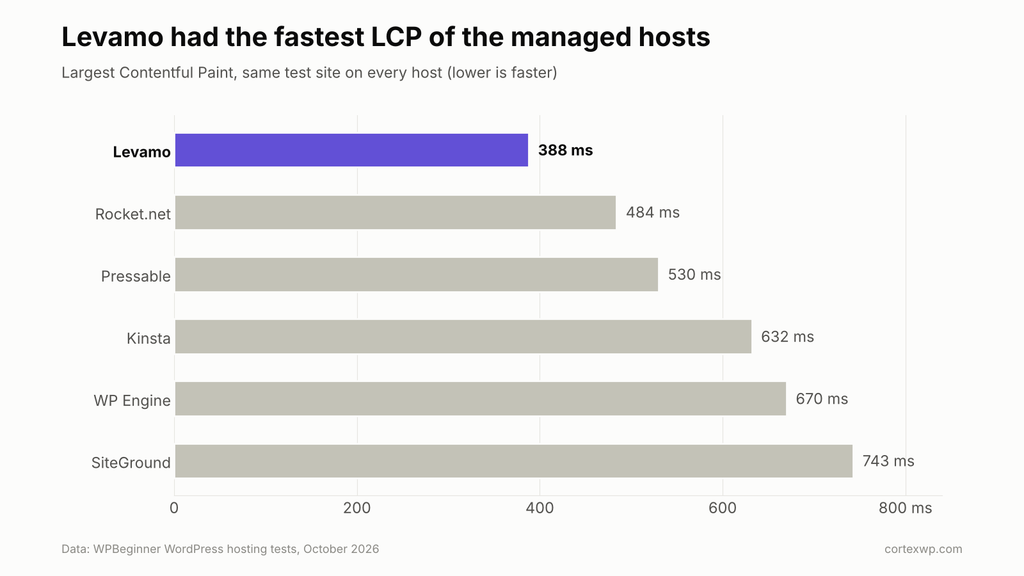
That’s the number that lines up most with what I’ve seen for years. A cold page on Levamo just shows up.
The rest of that test went the same way. Levamo had 100% uptime over 90 days. Under 50 simultaneous virtual users, the P95 response stayed around 40 ms, with zero failed requests. Its average global response time was 89 ms.
Levamo also publishes its own head-to-head benchmarks. Take any host’s own numbers with a pinch of salt. That said, I like how they test: the methodology uses real BuddyBoss, LearnDash, Tutor LMS and WooCommerce sites, one with over 5,000 users, not an empty Hello World install.
The requests-per-second column is the one to look at. That measures logged-in, uncached traffic, which is exactly the kind of load that hurt BuddyBoss sites on other hosts.
One honest note from an independent tester at Hosting.guru: the raw CPU scores on Starter and Business were nothing special. Once object cache and LiteSpeed Cache were on, though, Levamo still edged out his own high-end private server. The stack does the work, not the hardware brochure.
The CDN Does Real Work
Every Levamo plan, including Starter, comes with Cloudflare Enterprise. Elsewhere that’s usually a paid add-on. You control it from the Levamo dashboard, so there’s no separate Cloudflare account to manage.
How much does it matter? Hosting analyst Mangesh Supe of ThatMy.com measured time to first byte from nine regions, with and without the CDN in front of the same Starter site:
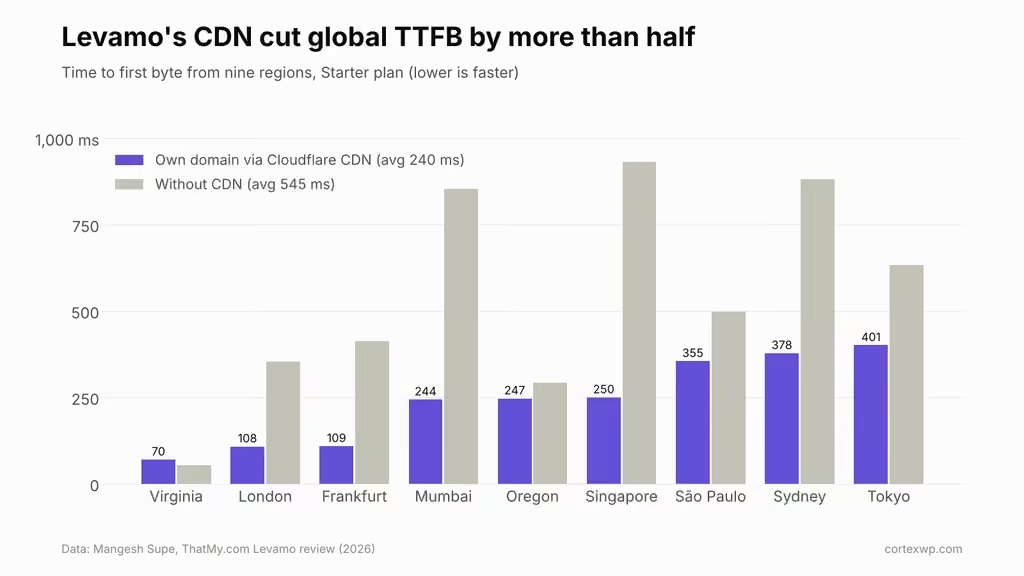
London went from 354 ms to 108 ms. Singapore went from 931 ms to 250 ms. If you only take one setup tip from this review, it’s this: put your real domain behind the CDN on day one.
WooCommerce Under Load
Cached pages are easy. Any decent host serves a cached homepage fast. The real test is 50 people adding to cart and checking out at the same time, because none of that is cacheable.
ThatMy.com ran that test on a 10,000-product WooCommerce store:
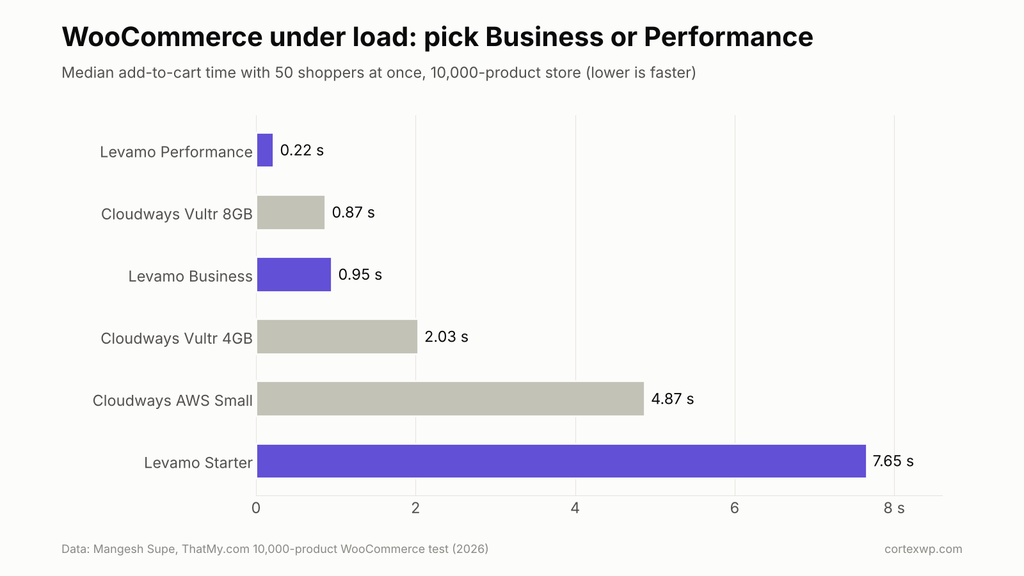
On the Performance plan, add-to-cart took 0.22 seconds with 50 shoppers hammering it. The plan peaked at 19 checkout journeys per second, the best in that test, including Cloudways servers that cost a lot more.
Now the part a sales page won’t tell you: Starter fell apart in the same test. Cart steps took 7.65 seconds, and the database went down at 100 users. Starter is a one-site plan with no object cache. It isn’t built for a busy store, and that’s fine. If you run a real WooCommerce shop, start on Business. Don’t learn this on Black Friday.
Traffic Spikes, Handled
PHP workers are the bottleneck most site owners have never heard of. When all of them are busy, new visitors wait in line. That’s how a “fast” site feels broken during a launch or a live class.
On Levamo, extra workers start automatically when traffic jumps and go away when it calms down. Business and up get 2x auto-scaling. You don’t file a ticket or upgrade mid-launch.
Each site also runs in its own container with dedicated CPU, RAM and workers. Someone else’s traffic spike, or someone else’s hacked plugin, can’t drag your site down.
Security at the Server
I’ve cleaned up enough hacked WordPress sites to stop trusting security plugins on their own. If malware gets into PHP, it can turn the plugin off.
Levamo puts security where plugins can’t touch it. Every plan includes a Cloudflare WAF with OWASP rules, DDoS protection, Monarx malware scanning that quarantines threats automatically, and free SSL.
For $4 per site per month, Advanced SiteShield adds Patchstack virtual patching. When a vulnerability is announced in one of your plugins, the exploit gets blocked before you’ve even had time to update. For any site that takes payments or stores member data, I’d turn it on.
What’s Included
This is where Levamo quietly wins on value. A lot of hosts sell these as add-ons. Here they come with every plan, Starter included:
- Daily offsite backups with one-click restore, plus on-demand snapshots. Hourly backups are $10/month per site.
- One-click staging that doesn’t count against your site limit.
- KeyDB & Redis object cache from Business up. This is what makes logged-in pages fast.
- Developer access: SSH, SFTP, WP-CLI, Git deployments, PHP version switching and cron.
- Unlimited free migrations, done by their engineers.
Built for Agencies
If you manage client sites, this part is nice. Every client gets an isolated environment, and you can give people exactly the access they need. There are four roles: Owner, Administrator, Billing manager and Guest, with 2FA settings across the team.
Support
Support is 24/7 live chat with actual WordPress engineers. There’s no phone support, which I don’t miss. Higher tiers and Enterprise get Slack channels and an account manager.
Levamo sits at 4.7 out of 5 on Trustpilot from 220 reviews. One recent review sums up the pattern I keep seeing. Kyle moved over after a rough year with another host, hit a few snags, and support jumped in right away. His words after the first site moved: “I couldn’t believe my eyes how much faster the site performed.”
To be fair, the same review mentions the managed migration asked for up to 48 hours before starting, so he did it himself. Levamo says most migrations get picked up within hours. If you’re in a hurry, plan for it.
Levamo Pricing
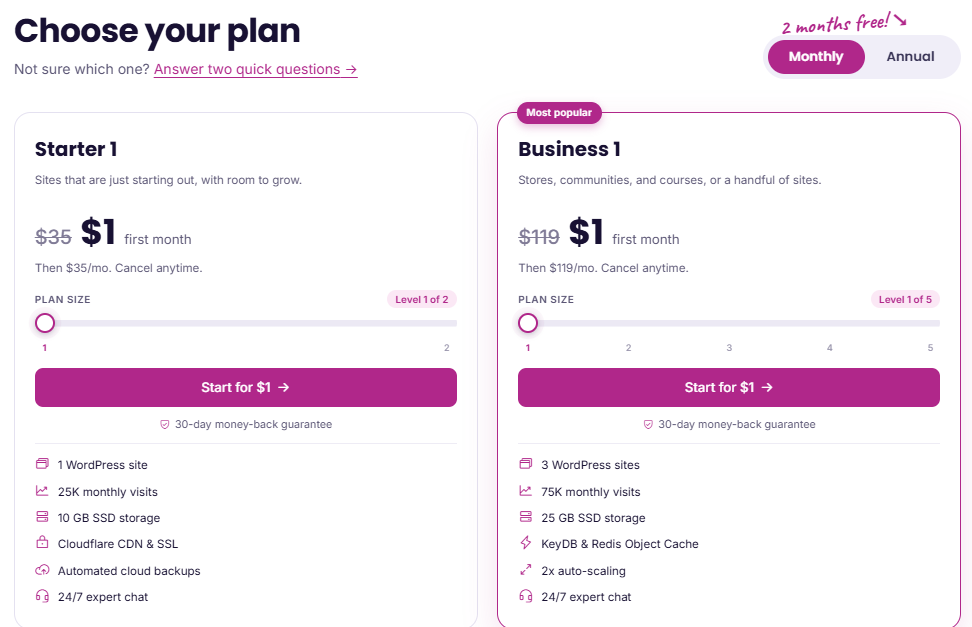
| Plan | Monthly | Yearly (per mo) | Sites | Good for |
|---|---|---|---|---|
| Starter | $35 | $29 | 1 | Blogs, brochure sites, new projects |
| Business | $119 | $99 | 3 | Stores, communities, courses |
| Performance | $359 | $299 | 20 | High-traffic stores, agencies |
| Enterprise | $779 | $649 | 30 | Big sites, priority support |
Extra sites are $20/month each. There’s a 30-day money-back guarantee, and there are no surprise overage bills. If you keep going over your visits, they tell you and suggest an upgrade.
Is it cheap? No. Add up Cloudflare Enterprise, a WAF, malware scanning, offsite backups, staging, object cache and auto-scaling bought separately, though, and Levamo stops looking expensive pretty quickly.
What I Don’t Love
No host is perfect, and I’d be lying if I pretended otherwise:
- Object cache starts at Business. I wish Starter had it.
- Starter isn’t for busy stores. The load test proves it.
- Only three server regions. If your visitors are mostly in Asia or Australia, uncached requests travel far. The CDN helps a lot, but not with everything.
- No email hosting and no phone support.
- Some settings are locked down. Support will change them for you, but power users might find it annoying.
Who Should Use Levamo
Use it if you run a WooCommerce store, a membership site, an LMS or a community, or if you’re an agency tired of babysitting servers. If your users log in, buy or interact, this is the kind of hosting your site needs.
Skip it if you have a small personal blog. Levamo would be great, but it’s more than you need.
How We Speed Up Levamo Sites
Good hosting is the foundation. This is the WordPress speed optimization routine we follow on top of it:
- Pick the right plan. Stores and communities go on Business or higher.
- Put your domain behind the CDN and turn on edge caching.
- Turn on the object cache. It’s the biggest win for logged-in pages.
- Use one optimisation plugin, not three. We use FlyingPress for critical CSS, delayed JavaScript, lazy loading and fonts.
- Run the latest stable PHP. Test it on staging first.
- Check the resource graphs to find heavy plugins, and replace them.
- Test after every change. Aggressive optimisation can quietly break a menu or a checkout button. That’s exactly why we built CortexWP: visual regression tests and real browser checks on top of FlyingPress, so you get the speed without the surprise.
My Verdict
I’ve watched this platform rescue slow BuddyBoss sites since before most people had heard of it. It was fast then. It’s faster now, and everything around the speed has caught up: security, the dashboard, team tools and AI.
The independent numbers say the same thing my experience does. If you run a store, a membership site, a course or a community, Levamo deserves a serious spot on your shortlist of the best WordPress hosting for dynamic sites.
It costs $1 to try for a month, and they’ll move your site for free. Load your slowest page afterwards and see for yourself.
Levamo Review FAQs
Is Levamo good for WooCommerce?
Yes, on the right plan. Performance handled 50 shoppers with a 0.22-second add-to-cart in independent tests. Busy stores should start on Business or higher.
How much does Levamo cost?
It’s $35/month for Starter, or $29/month billed yearly. Business is $119/month ($99 yearly). Your first month is $1, and there’s a 30-day money-back guarantee.
Is Levamo faster than Kinsta?
In WPBeginner’s October 2026 tests, Levamo’s LCP was 388 ms vs Kinsta’s 632 ms, and it held up better under load.
Do I still need a caching plugin on Levamo?
Levamo handles server and edge caching. A front-end caching plugin like FlyingPress is still the best; it also helps with CSS, JavaScript, and images. CortexWP automatically tests your pages to check if anything broke because of any optimization setting from FlyingPress, and our AI auto-fixes it.
Disclaimer: CortexWP is not affiliated with Levamo. CortexWP is not a part of Levamo, and Levamo is not a part of CortexWP. When you use Levamo, you agree to the Levamo Terms of Service.