100,000 tokens included
Enough room to test CortexWP on real WordPress debugging and maintenance questions.
100,000 free CortexWP AI tokensNo card neededStart free with 100,000 CortexWP AI tokens. No credit card needed.
ClaimClaim TokensPricing
Sign up with 100,000 free tokens and no credit card. In CortexWP AI, usage includes reasoning, WordPress site inspection, log analysis, command preparation, file reads, code changes, verification, and the final response.
Free credits
Use the free tokens to connect a site, ask a real WordPress question, inspect the evidence, and see how approval-first engineering feels before choosing a paid plan.
Enough room to test CortexWP on real WordPress debugging and maintenance questions.
Create the account first. Upgrade only when CortexWP belongs in your normal site workflow.
Free or paid, CortexWP shows the action, reason, impact, and rollback notes before material changes.
$5/month
1M tokens/month
For one-site owners who want practical WordPress AI help for small fixes, checks, and cleanup.
Start with Starter$15/month
5M tokens/month
For active businesses, agencies, and production sites that need recurring AI WordPress debugging.
Choose Pro$50/month
20M tokens/month
For heavier incidents, multi-site work, deeper inspections, and larger WordPress engineering jobs.
Choose UltraA failed update, broken checkout, fatal admin error, DNS mistake, or plugin conflict usually costs hours before the real cause is even known. CortexWP AI is priced so you can keep AI WordPress investigation close, even when the issue is not urgent yet.
CortexWP starts with the connected install: logs, files, plugins, themes, config, and DNS signals. You are buying faster movement from symptom to evidence.
Every material action comes with what will run, why it matters, expected impact, and rollback notes where relevant. Speed does not mean giving up control.
Credits cover the full engineering loop: reasoning, inspection, commands, file reads, code edits, verification, and the final explanation.
Choose with confidence
The plan names are intentionally simple. If CortexWP becomes part of your normal WordPress maintenance loop, Pro is the sensible starting point. If you expect heavier debugging or multiple sites, Ultra gives the agent more room to inspect, compare, and verify.
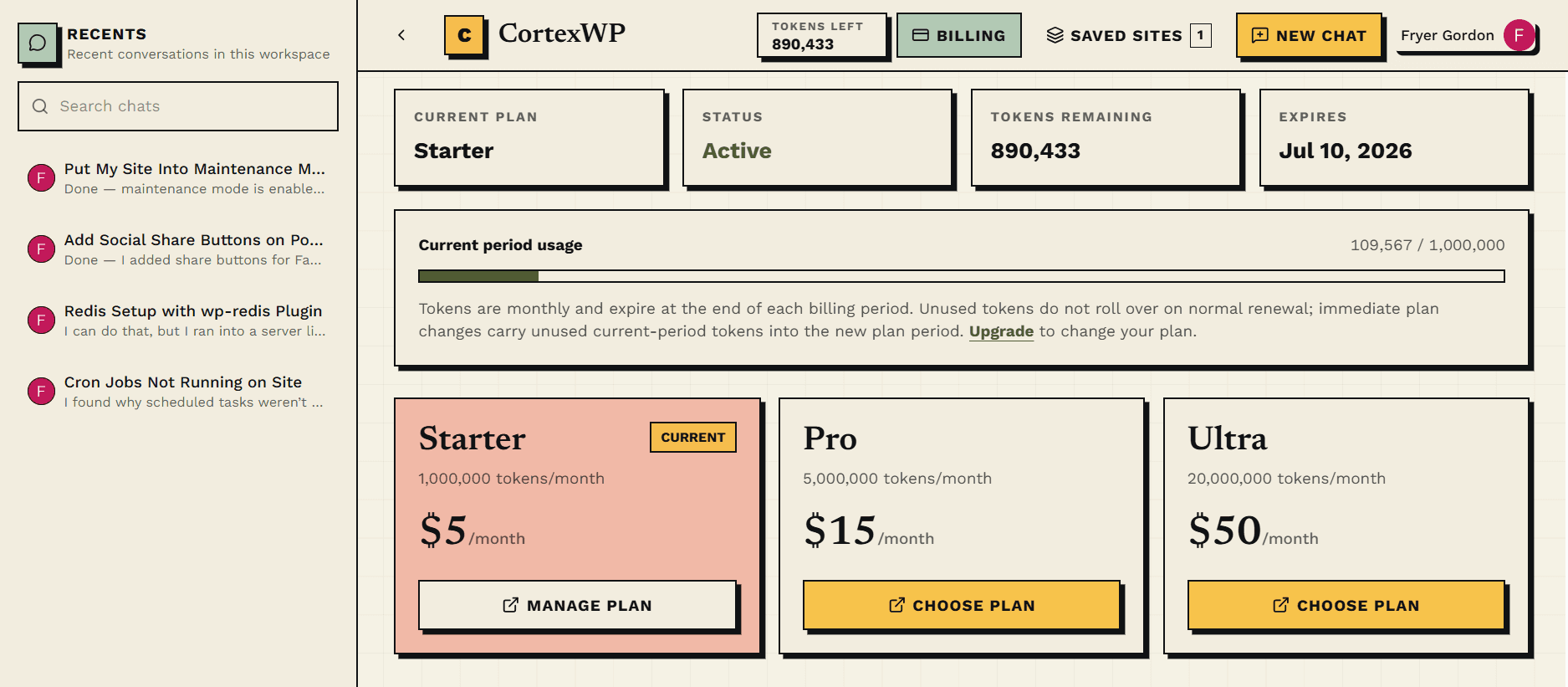
Best when you manage one site and want backup for small fixes, plugin tasks, warnings, quick checks, and occasional troubleshooting.
The practical default for active businesses, agencies, and production sites that need recurring debugging and maintenance help.
For heavier sites, frequent incidents, deeper investigations, multi-site work, and larger backend changes where need an extra hand.
Connect the site, ask for the fix, review the proposed action, and approve to deploy.