ManageWP Alternative

The AI-powered alternative to ManageWP.

Everything ManageWP does — updates, backups, site management — plus visual regression testing, five-layer uptime monitoring, security, broken link checking, and an AI agent that connects to your WordPress sites and fixes real problems. All free. Unlimited sites.

✓ 100,000 free AI tokens✓ Free management tools✓ Unlimited sites
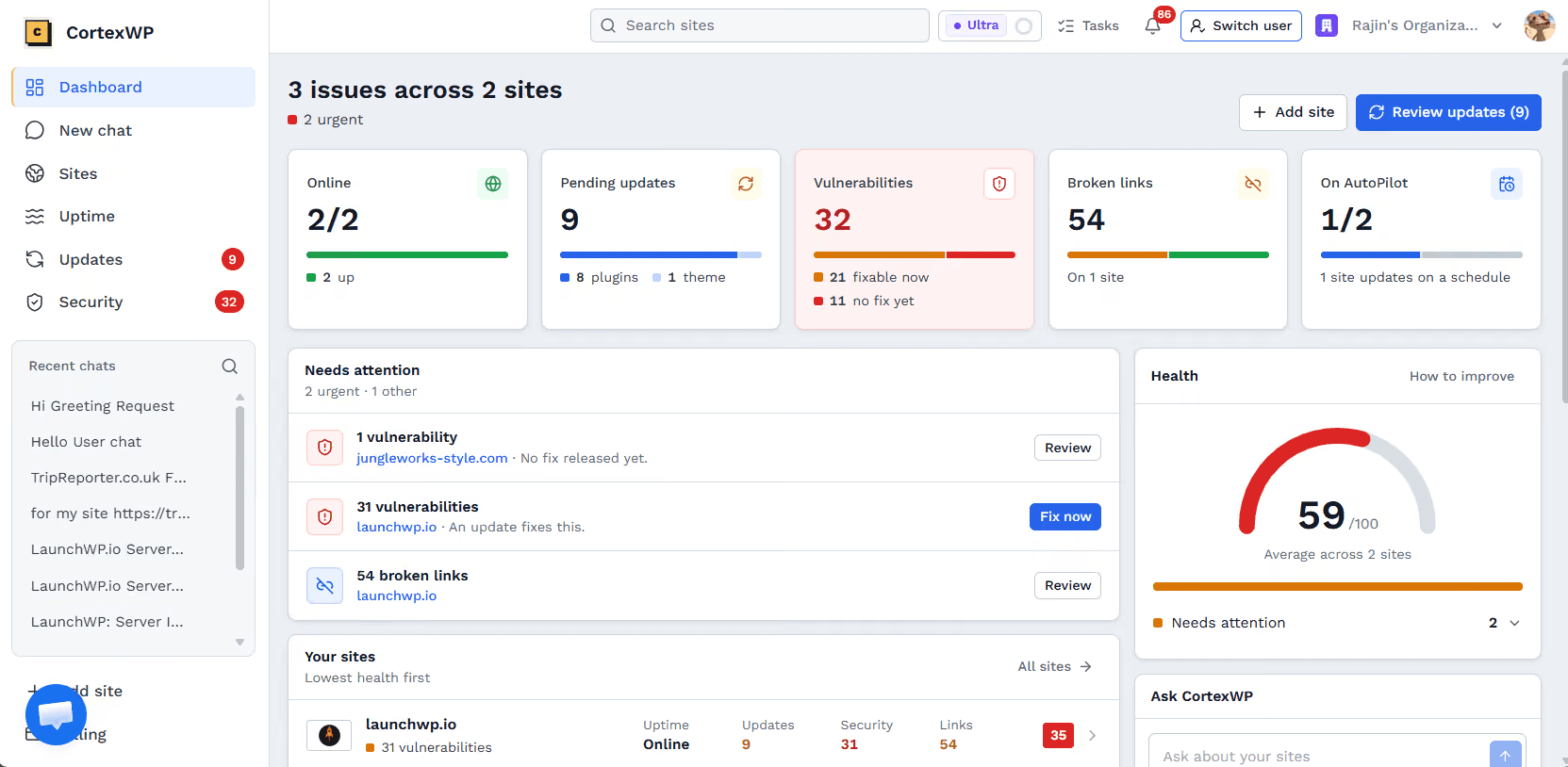
CortexWP WordPress management dashboard showing site health, vulnerabilities, broken links, pending updates, and uptime across multiple sites
ManageWP
  • Basic updates free — everything else is a paid add-on
  • $1–$4/site/month per add-on
  • No visual regression testing
  • No AI agent
  • No automatic speed optimization
vs
CortexWP
  • AI-powered WordPress management platform
  • Free management tools — unlimited sites
  • Visual regression testing on every update
  • AI agent reads logs, files, and config
  • AI speed optimization with FlyingPress

Why agencies switch from ManageWP to CortexWP.

ManageWP was built for a world before AI. CortexWP is a management platform with an AI agent that does the work — and includes everything ManageWP charges extra for.

An AI agent that actually connects to your site

ManageWP gives you buttons. CortexWP gives you an AI engineer. It reads your actual error logs, inspects plugin conflicts, reviews wp-config, and proposes fixes you approve before they run. No more copy-pasting error messages into ChatGPT or hiring a developer for a quick fix.

Free management tools — no add-on fees

ManageWP charges separately for backups, security, performance, uptime, SEO, and reports — each one a per-site monthly add-on. CortexWP includes everything free: uptime monitoring, backups, safe updates, security scans, broken link checks, visual regression testing, and maintenance history. Unlimited sites.

Visual regression testing built into every update

ManageWP has no visual regression testing. You update and hope nothing breaks. CortexWP captures before-and-after screenshots on desktop and mobile after every single update, so you see exactly what changed and can roll back with one click.

One update at a time, not bulk

ManageWP runs bulk updates, making it impossible to tell which plugin broke your site. CortexWP AutoPilot updates one component at a time — backup, update, visual regression test, report. If something breaks, you know exactly which update caused it.

Five-layer uptime monitoring — not just homepage

ManageWP checks your homepage. CortexWP checks your homepage, database, cron jobs, disk space, and external HTTP connections independently. When something goes wrong, you know exactly which component failed — and the AI can investigate.

No per-site fees eating into your margins

With ManageWP, every add-on on every client site adds to your monthly bill. A 50-site agency with full features can pay $200+/month. With CortexWP, you connect unlimited sites for free and pay only for AI tokens when you need them.

CortexWP vs ManageWP — feature by feature.

A side-by-side comparison of every feature that matters for WordPress management.

FeatureCortexWPManageWP
AI agent that connects to sites
AI-powered speed optimization
Visual regression testing
Safe automatic updates
One-at-a-time updates
Component-level backups + rollback
Full-site backups (free)Monthly only
Uptime monitoring (free)
Database health check
Cron job monitoring
Disk space monitoring
External HTTP check
SSL certificate monitoring
Broken link checker (free)
Missing image detection
Redirect creation from dashboard
PHP error monitoring
Stack trace + component attribution
Vulnerability scanning (free)
Security hardening toggles
Login monitoring
Site health dashboard
Maintenance / update history
Cache safety verification
PageSpeed Insights integrationPaid add-on
Full audit trail for every action
Free management tools
Unlimited sites at no extra cost
AI-powered troubleshooting

How CortexWP compares in every category.

A detailed look at what each platform offers across the capabilities that matter most.

AI-Powered Agent

CortexWP leads
CortexWP

AI agent connects to your site, reads logs, files, config, and database. Diagnoses from real evidence and applies approved fixes.

ManageWP

No AI agent. Standard dashboard tools for manual site management.

Safe Updates

CortexWP leads
CortexWP

AutoPilot updates one plugin at a time. Full-site backup first, individual component backups, visual regression test after each update, detailed report with rollback.

ManageWP

Bulk safe updates with optional pre-update backups. No individual component isolation or per-update visual regression testing.

Visual Regression Testing

CortexWP leads
CortexWP

Built into every update. Before-and-after captures on desktop and mobile. Configurable threshold. Connected to update history and one-click rollback per component.

ManageWP

No built-in visual regression testing. Relies on manual review after updates.

Uptime Monitoring

CortexWP leads
CortexWP

Five independent checks: homepage, database, cron jobs, disk space, and external HTTP. SSL certificate monitoring. Incident history with recovery timeline.

ManageWP

Basic uptime monitoring as a paid add-on. Homepage checks only.

Backups

CortexWP leads
CortexWP

Full-site backups stored offsite. Component-level backups before each update. Restore from dashboard. Automatic backups before every AutoPilot run. No paid add-ons.

ManageWP

Free monthly backups. Hourly, daily, and weekly backups are paid add-ons starting at $2/site/month.

Security Monitoring

CortexWP leads
CortexWP

Vulnerability scanning for core, plugins, and themes against known databases. Built-in hardening toggles. Login activity monitoring. PHP error tracking.

ManageWP

Security scans as a paid add-on ($1–$2/site/month). Basic vulnerability alerts.

Broken Link Checker

CortexWP leads
CortexWP

Crawls all pages and posts. Finds broken links and missing images. Source page, anchor text, failure reason. Create redirects and sync back to WordPress.

ManageWP

SEO ranking tool as a paid add-on. No dedicated broken link scanning.

PHP Error Monitoring

CortexWP leads
CortexWP

Tracks fatal errors, warnings, and notices. Groups recurring issues with stack traces and component attribution. AI can investigate and propose fixes.

ManageWP

No PHP error monitoring. Errors must be found through manual log inspection.

Speed Optimization

CortexWP leads
CortexWP

AI analyzes your site with PageSpeed Insights and browser diagnostics. Configures FlyingPress automatically. Tests each change individually. Keeps only what works. Cache safety verification.

ManageWP

Performance checks as a paid add-on. No automatic optimization engine.

Maintenance Records

CortexWP leads
CortexWP

Complete maintenance history with timestamps, versions, visual regression results, AI action log, and full audit trail. Every action documented automatically.

ManageWP

Client reports as a paid add-on ($1/site/month). Limited action history.

Pricing Model

CortexWP leads
CortexWP

All management tools free — unlimited sites. Pay only for AI tokens. Starter $5/mo (1M tokens), Pro $15/mo (5M tokens), Ultra $50/mo (20M tokens). 100,000 free tokens to start.

ManageWP

Free for basic updates only. Premium add-ons $1–$4/site/month each. Backups, security, performance, SEO, uptime, and client reports all cost extra.

Pricing that scales with your agency, not against it.

ManageWP charges per site, per add-on, per month. CortexWP's management tools are free for unlimited sites. You only pay for AI tokens when you need them.

ManageWP pricing
$1–$4/site/month per add-on
  • Free plan = basic updates only
  • Backups: $2/site/month
  • Security: $1–$2/site/month
  • Uptime: $1/site/month
  • Performance: $1/site/month
  • Client reports: $1/site/month
  • 50 sites with all add-ons = $200+/month
CortexWP pricing
$0/site/month

Management tools free — unlimited sites

  • Free tier: 100,000 AI tokens/month
  • Starter: $5/mo — 1M AI tokens
  • Pro: $15/mo — 5M AI tokens
  • Ultra: $50/mo — 20M AI tokens
  • 50 sites = $0 management + AI plan
  • 100 sites = $0 management + AI plan

Switching from ManageWP? It takes two minutes per site.

Install the CortexWP plugin or connect with SFTP/SSH. Your existing WordPress setup stays exactly as it is. CortexWP starts monitoring immediately after connection.

1

Create your free account

No credit card required. Set up your workspace in under a minute.

2

Connect your sites

Install the CortexWP plugin or add your SFTP/SSH credentials.

3

Configure AutoPilot

Set update schedules and visual regression testing settings per site.

4

Start using the AI

Ask CortexWP to investigate a problem or optimize your site speed.

Start with 100,000 free tokensNo credit card. No per-site fees. Cancel any time.

Everything you need to manage WordPress professionally.

CortexWP replaces ManageWP and its stack of paid add-ons with one platform. Here is what is included at no cost.

AI WordPress agent

Connects to your site, reads logs, files, plugins, themes, settings, and database context. Proposes changes you approve.

Learn more

Safe update automation

Backup-first updates, one at a time, with visual regression testing after each change and rollback.

Learn more

Uptime monitoring

Homepage, database, cron, disk, external HTTP, and SSL certificate. Five independent health checks.

Learn more

Broken link checker

Finds broken links and missing images with source page, failure reason, and redirect creation.

Learn more

PHP error monitoring

Fatal errors, warnings, and notices with stack traces, component attribution, and AI investigation.

Learn more

Security monitoring

Vulnerability scanning, hardening toggles, and login monitoring for every connected site.

Learn more

Backups & restore

Full-site backups stored offsite. Component backups before each update. Restore from the dashboard.

Learn more

Visual regression testing

Before-and-after screenshots on desktop and mobile around every update. Configurable threshold.

Learn more

AI speed optimization

CortexWP AI + FlyingPress. Analyzes your site, finds the optimal config, tests each change, keeps only what works.

Learn more

Site health dashboard

Uptime, security, errors, links, and updates in one view across all your connected sites.

Learn more

Login monitoring

Track successful and failed login attempts with user, role, IP address, and timestamp.

Learn more

Maintenance history

Every update, backup, restore, and visual check in a searchable, timestamped timeline.

Learn more

Frequently asked questions.

Common questions about switching from ManageWP to CortexWP.

What is the best alternative to ManageWP?

CortexWP is the best ManageWP alternative for WordPress agencies and site owners. CortexWP includes everything ManageWP offers — updates, backups, and site management — plus visual regression testing, five-layer uptime monitoring, broken link checking, PHP error monitoring, security hardening, and an AI agent that connects directly to your sites, reads real error logs, and applies fixes you approve. All management tools are free with unlimited sites.

How is CortexWP different from ManageWP?

The biggest differences are CortexWP's AI agent and its pricing model. ManageWP charges per-site add-on fees for backups, security, uptime, performance, and reports — features that CortexWP includes free. CortexWP also offers visual regression testing on every update, one-at-a-time updates with per-component rollback, five-layer uptime monitoring (homepage, database, cron, disk, external HTTP), PHP error monitoring, broken link checking, and an AI agent that reads your actual site files and proposes fixes.

Is CortexWP free?

Yes. All management tools are free — uptime monitoring, backups, safe updates with visual regression testing, security scans, broken link checks, and maintenance history. You can connect unlimited WordPress sites at no cost. Paid plans ($5, $15, or $50 per month) cover AI tokens for when you want CortexWP AI to investigate, diagnose, and fix problems on your sites. You get 100,000 free AI tokens to start, no credit card required.

How much does ManageWP cost compared to CortexWP?

ManageWP's free plan only covers basic updates. Everything else — backups ($2/site/month), security ($1–$2/site), uptime ($1/site), performance ($1/site), SEO ($1/site), and client reports ($1/site) — are paid add-ons. A 50-site agency with full features pays $200+/month. CortexWP's management tools are free for unlimited sites, with AI tokens starting at $5/month regardless of site count.

Can CortexWP replace ManageWP?

Yes. CortexWP covers every core ManageWP feature — updates, backups, and site dashboards — and adds visual regression testing, one-at-a-time updates with per-component rollback, five-layer uptime monitoring, broken link checking, PHP error monitoring with stack traces, security vulnerability scanning with hardening toggles, login monitoring, AI-powered speed optimization, cache safety verification, and an AI agent for troubleshooting.

Does CortexWP have visual regression testing?

Yes. CortexWP runs visual regression tests on both desktop and mobile viewports after every individual update. ManageWP does not have visual regression testing. CortexWP tests after each single plugin or theme update so you know exactly which change caused a visual difference. You can configure the acceptable change threshold per site and review before-and-after screenshots with highlighted differences.

Does ManageWP have an AI agent?

No. ManageWP is a traditional WordPress management dashboard without AI capabilities. CortexWP's AI agent connects to your WordPress site through the CortexWP plugin or SFTP/SSH, reads PHP error logs, inspects plugins, checks theme files, reviews the database, and proposes fixes you approve before they run. Every action is logged with a full audit trail.

Is ManageWP really free?

ManageWP's free plan covers only basic one-click updates. The features agencies actually need — automated backups, security scanning, uptime monitoring, performance checks, SEO ranking, and client reports — are all paid add-ons charged per site per month. CortexWP includes all management features free for unlimited sites, and you only pay for AI tokens when you want automated troubleshooting.

Can I migrate from ManageWP to CortexWP?

Yes. Connect your WordPress sites to CortexWP by installing the CortexWP plugin (takes about two minutes per site) or connecting with SFTP/SSH. Your existing WordPress data, plugins, themes, and configuration stay exactly as they are. CortexWP starts monitoring immediately after connection. You can run both platforms side by side during the transition.

Is CortexWP good for WordPress agencies?

CortexWP is built for agencies and site owners who manage WordPress professionally. The free management tools mean you can connect every client site without per-site costs eating into your margins. The AI agent handles troubleshooting that would otherwise require senior developer time. AutoPilot keeps updates safe and documented with visual regression testing. And the portfolio dashboard shows which sites across your entire portfolio need attention.

Start managing WordPress with AI.

Free management tools. Unlimited sites. 100,000 AI tokens to start. No credit card required.