Blog
How to Check WordPress Site Health with CortexWP
CortexWP gives you a place to review WordPress site health findings without digging through separate admin screens. Open a connected website and choose Security → Site Health to see configuration and maintenance issues that deserve review, including unused themes, pending updates and potentially risky settings.
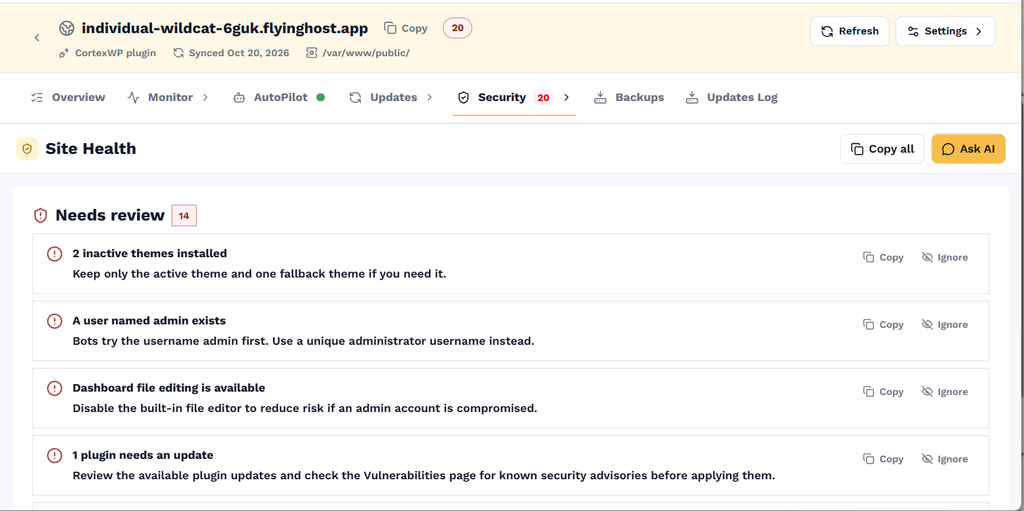
The CortexWP Site Health page explains each finding and includes actions to copy findings or ask AI for help. Here’s how to review the report, decide what actually needs fixing, and use Security → Hardening without accidentally disrupting an integration your site depends on.
Open CortexWP Site Health for a connected website
Sign in to CortexWP, open Sites and choose your WordPress website. From the site navigation, select Security → Site Health. The page displays checks that need review, along with practical descriptions of what CortexWP found and why each issue could matter.
For example, a site health report might flag multiple unused themes, an administrator account with an easily guessed username, the built-in WordPress file editor being available, pending plugin updates or XML-RPC being enabled. These aren’t all evidence of an active compromise. They’re configuration and maintenance findings that deserve attention according to how the site is used.
Understand WordPress Site Health findings in CortexWP
The Site Health page shows an explanation beneath each issue. An unused theme can create unnecessary maintenance overhead; an outdated plugin may expose a known vulnerability; and exposed administration features can increase risk if an account is compromised.
Read the finding in context. XML-RPC, for instance, may be unnecessary on one website but still used by a particular integration on another. Disabling it without checking that dependency could interrupt legitimate functionality. Security hardening should reduce avoidable risk without breaking the site.
Review CortexWP WordPress hardening controls
To review the controls available for your connected website, open Security → Hardening. This is the section for adjusting security-hardening settings. Before changing an option, understand what the setting does and whether an existing plugin, integration or workflow depends on it.
Start with low-risk housekeeping such as reviewing unnecessary plugins and themes, checking for pending updates and reducing access to features you don’t use. Changes to authentication, file editing or XML-RPC deserve special care. If you manage client websites, document changes so another developer can tell why the setting was adjusted.
Copy findings or investigate them with CortexWP AI
The Site Health page includes Copy all and Ask AI actions. Copying the results is useful for a client maintenance report or a support ticket. With Ask AI, you can bring the findings into CortexWP AI for an explanation and a proposed fix that takes the connected site’s context into account.
You can ask which findings are most urgent, which involve public-facing exposure and which may be expected for your site’s configuration. Start in read-only mode when you want analysis only. If you decide to make changes, review and approve the action in read/write mode rather than applying every recommendation automatically.
Connect Site Health to CortexWP vulnerability monitoring
A site health warning and a known vulnerability are different signals. Site health can point out risky configuration, while vulnerability monitoring checks installed WordPress core, plugin and theme versions against reported security issues. Review both, especially when the health report highlights outdated components.
The WordPress vulnerability monitoring guide explains how to check for patches and understand findings. To review who is accessing the admin area, see the WordPress login activity guide.
Use CortexWP Site Health for ongoing maintenance
A site that passed health checks last month may have new issues after installing a plugin, changing a user account or modifying the server environment. Revisit the Site Health page as part of ongoing maintenance, alongside uptime monitoring, safe updates and backups.
Use CortexWP Site Health as a review list, not a score to chase. Work through the findings that matter to your WordPress setup, check the related vulnerability monitoring results, and use the Hardening controls only when you understand their impact. That gives you a documented, repeatable maintenance workflow.