Blog
FlyingHost Review 2026: Real Speed Tests, Pricing & Verdict
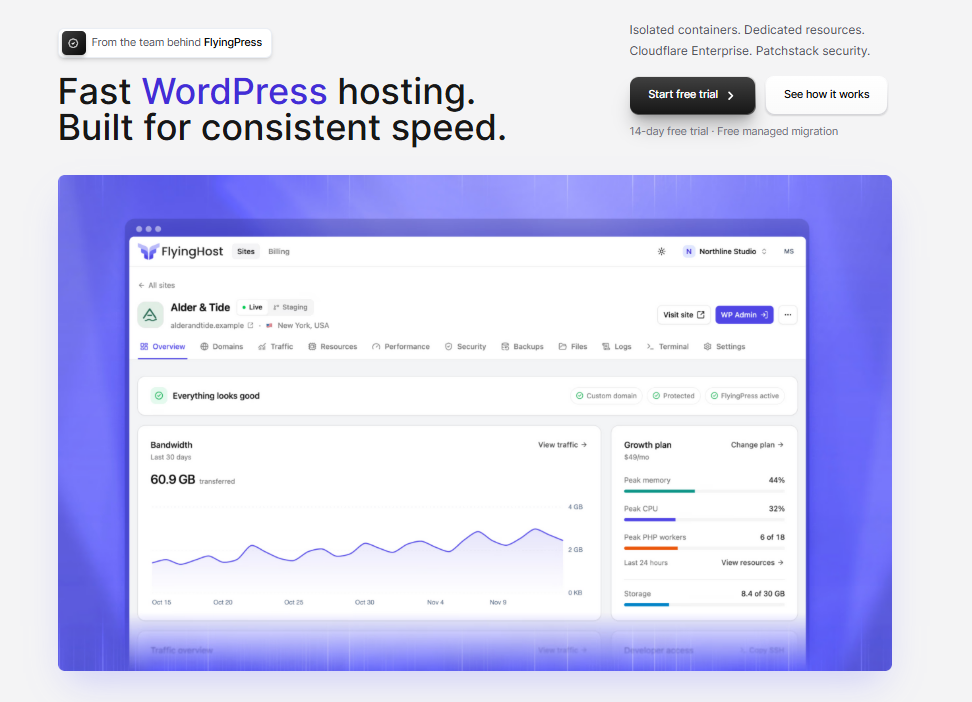
FlyingHost is one of the newest names in managed WordPress hosting, and it comes from a team a lot of WordPress people already trust: the makers of FlyingPress.
In this FlyingHost review, we cover how it performs in real speed tests, what each feature does, what it costs, and the few things worth knowing before you sign up. We’ve used FlyingHost ourselves, and we’ve checked our impressions against independent test data, so you can judge it on the numbers.
Our Quick Verdict
- Who it’s for: almost any WordPress site, from blogs and business sites to stores and agencies.
- Speed: a 0.13 s cached TTFB and 46–110 ms first byte across four continents in independent tests.
- Included: FlyingPress, Cloudflare Enterprise and Patchstack, on every plan.
- Price: from $19/month per site, with a 14-day free trial and free managed migration.
- Our rating: our top pick for WordPress hosting in 2026.
Try FlyingHost Free for 14 Days
What Is FlyingHost?
FlyingHost is managed WordPress hosting built by FlyingWeb, the team behind FlyingPress. If you’ve followed WordPress performance at all, you know that name. FlyingPress is one of the most respected caching and optimization plugins around, and it’s the engine CortexWP is built on top of.
That’s why FlyingHost caught our attention in the first place. Most hosts build servers and then hope your caching plugin plays nicely with them. FlyingHost was built by the people who make the caching plugin. The server, the cache and the optimisation layer were designed to work together from day one.
Every site runs in its own isolated container with dedicated CPU, RAM, PHP workers, its own MariaDB database, and its own Redis. As of now (November, 2026), FlyingHost has six data centers: New York, London, Falkenstein (Germany), Mumbai, Singapore, and Sydney.
Why We Chose FlyingHost
We’ve tested a lot of WordPress hosting over the years. We’ve also reviewed Levamo, which we still think is excellent for heavy logged-in sites. So why is FlyingHost our top pick?
Because for the sites most people actually run, it gets more things right at once. FlyingPress is built in. There are twice as many server regions. It’s half the entry price. You can try it free for two weeks. And the whole stack is tuned around one goal: consistent speed, without you touching server settings.
When we set a site up on FlyingHost and switched FlyingPress on, it felt like the way WordPress hosting should work. There was no plugin fighting the server cache and no guesswork about which layer was doing what.
FlyingHost Speed Test Data
We don’t want you taking our word for it, so here’s what independent testing found. A site was tested on the FlyingHost Core plan in Singapore. It was compared with the same WordPress site on a $5 VPS.
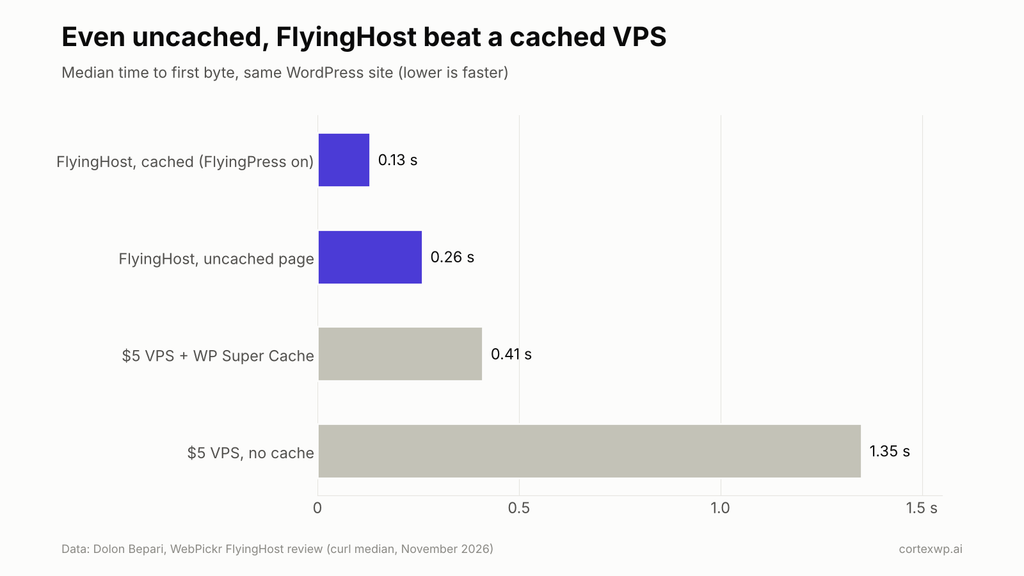
Look at the second bar. Uncached pages on FlyingHost came back in 0.26 seconds. That’s faster than the VPS managed with a caching plugin. Turn FlyingPress on, and the cached TTFB drops to 0.13 seconds.
The uncached number is the one we care about most. Logged-in users, carts, checkouts and search results skip the page cache, so a fast uncached response means the whole site feels quick, not just the homepage.
Global TTFB With FlyingPress
Here’s where the FlyingHost and FlyingPress combination really shows. With FlyingPress on, cached pages are served from Cloudflare Enterprise’s edge, close to every visitor:
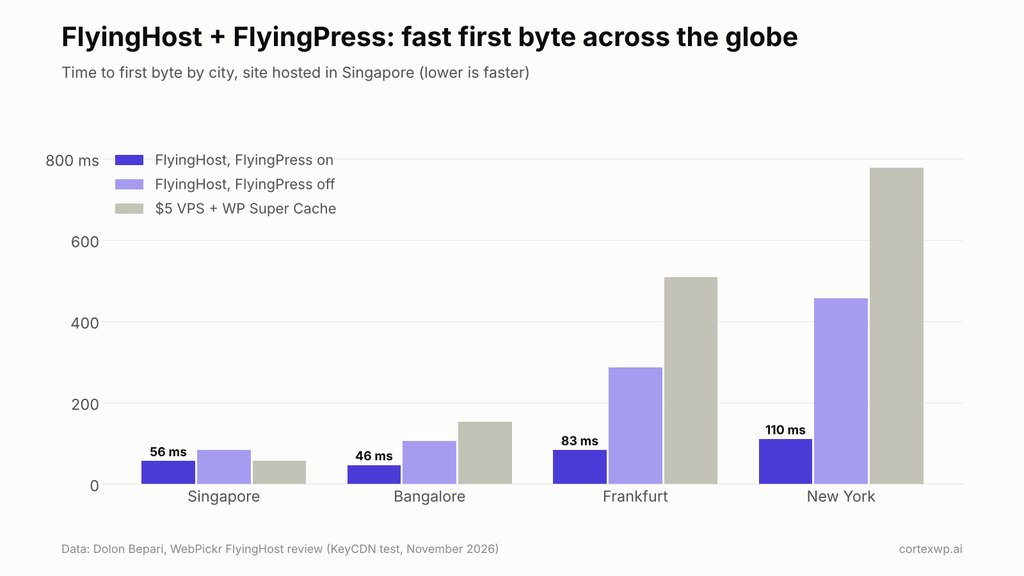
The site was hosted in Singapore. With FlyingPress on, New York got the first byte in 110 ms, down from 457 ms with it off. Frankfurt dropped from 287 ms to 83 ms. The $5 VPS took 777 ms to reach New York.
The rest of the results were just as clean:
- PageSpeed Insights (mobile): 100, with a 1.1 s LCP.
- WebPageTest from Tokyo: 0.234 s TTFB and a 0.494 s LCP.
- Server benchmark: 9.4 overall on the Hosting Benchmark plugin.
- Load test: ramping up to 25 concurrent clients, a 13 ms average response with 0% errors across 63,714 requests. The origin CPU barely moved (0.1%), because Cloudflare’s edge absorbed the traffic.
- Redis: a 97% object cache hit ratio within the first hour.
The Performance Stack

Here’s what’s under the hood:
- 5GHz+ servers with NVMe storage. High clock speed matters for WordPress, because PHP mostly runs on one core per request.
- A tuned WordPress stack. Nginx, PHP 8.5, HTTP/3, MariaDB, Redis and cron are all configured for WordPress out of the box.
- Isolated containers. Each site gets reserved resources, so one busy site never slows down another.
- A dedicated database and Redis per site. You don’t share MariaDB or object cache with anyone.
FlyingPress Built In
FlyingPress normally costs extra. On FlyingHost, it’s included on every plan, and you switch it on from Cockpit with one click.
That means page caching, critical CSS, unused CSS removal, JavaScript delay, lazy loading, font optimization and image optimization, all from the same team that tuned the server underneath it. In our experience, this is the cleanest setup you can get for WordPress speed. One cache, one team, no conflicts.
Our FlyingPress Integration
This is where CortexWP comes in, and why FlyingHost fits our workflow so well.
CortexWP’s AI speed optimization is built on FlyingPress. Our AI loads your site in a real browser and runs PageSpeed to find what’s slowing it down. Then it turns on exactly the FlyingPress settings your site needs and checks that nothing broke. It uses visual regression and interactivity tests on desktop and mobile, and if a change breaks a menu, a form or a layout, it rolls that change back automatically.
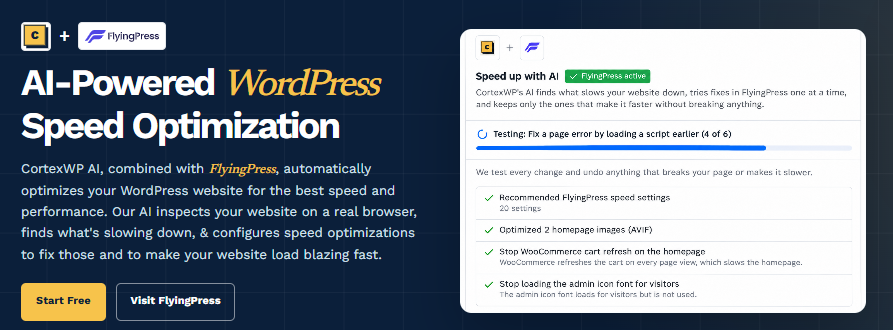
Put the three together, and you get the full speed stack: FlyingHost for the server, FlyingPress for caching and optimization, and CortexWP to configure and verify it all. Fast hosting, the best optimization plugin, and an AI that makes sure your site still works.
Cloudflare Enterprise & Security
Every plan includes Cloudflare Enterprise for CDN and edge security, plus Patchstack virtual patching for WordPress core, plugins and themes. On most hosts, either one of those is a paid add-on.
Patchstack blocks known plugin exploits before you’ve had time to update. Cloudflare filters bad traffic at the edge before it ever reaches your server. In a test, Cloudflare blocked 1,500 threats in 30 days on a brand-new test site. Bots were challenging the login page within days. Imagine what it’s doing for a real site.
The Cockpit Dashboard
Cockpit is FlyingHost’s control panel, and it’s one of the cleanest we’ve used. Everything you do day-to-day lives in one place.
- Staging sites. On a test, a staging copy was ready in about 13 seconds.
- Instant backups. A manual backup took 2.5 seconds and a restore took 3.5 seconds. Up to 14 days of backups are kept, and you can schedule them as often as every 2 hours.
- One-click WP admin login, without sharing passwords.
- Caching and CDN insight, showing bandwidth, requests and cache hit rate.
- Real-time logs, a file manager, phpMyAdmin and a web terminal with SSH and WP-CLI.
Built for Agencies
If you manage client sites, FlyingHost has organization-based site access, roles for every workspace, and quick switching between accounts. Because every site has its own container, one client’s traffic spike never touches another client’s site.
FlyingHost Pricing
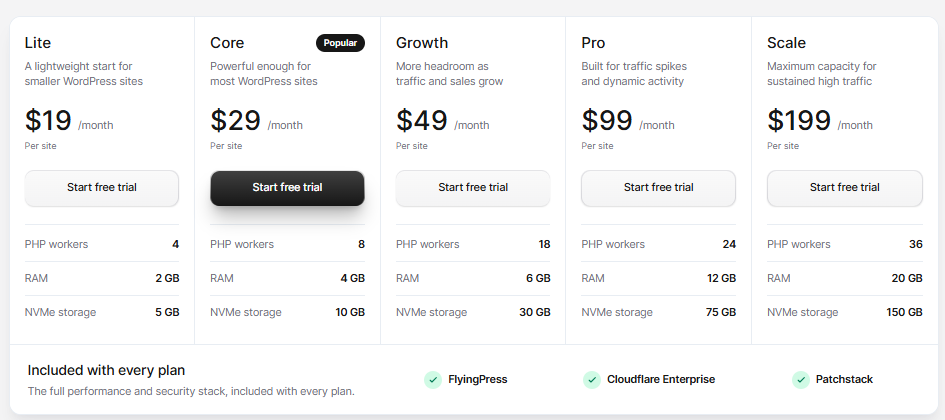
Every plan includes 100 GB of CDN bandwidth per month. Extra bandwidth is $5 per 100 GB, and extra storage is $10 per 10 GB. There’s no teaser price that jumps at renewal. What you see is what you pay.
You get a 14-day free trial and a free managed migration, where the team tests your site before DNS is switched. For most sites, we’d start on Core. Eight PHP workers and 4 GB of RAM is a lot of headroom for $29.
FlyingHost vs Levamo
We’ve reviewed both. Here’s how they compare on paper:
| FlyingHost | Levamo | |
|---|---|---|
| Starting price | $19/mo | $35/mo |
| Trial | 14 days free | $1 first month |
| Data centers | 6 (US, UK, DE, India, Singapore, Australia) | 3 (US East, US West, Dublin) |
| FlyingPress included | Yes | No |
| Cloudflare Enterprise | Yes | Yes |
| Patchstack | Included | $4/mo add-on |
| Redis on entry plan | Yes | From Business ($119) |
| Sites per plan | 1 | 1–30+ |
For most WordPress sites, FlyingHost gives you more for less: FlyingPress, Patchstack and Redis from the cheapest plan, twice the regions, and a free trial. Levamo still makes sense if you want lots of sites on one bill, or if you run a very large BuddyBoss-style community. For everyone else, FlyingHost is our pick.
Things to Know
No host is perfect. Here’s what to keep in mind:
- Turn on the extras. FlyingPress, Redis, and Patchstack are off on new sites. It’s one click each in Cockpit. CortexWP can help you test if your website runs correctly with FlyingPress cache, and fix it with AI.
- Use the trial properly. Payments aren’t refundable once a paid plan starts, so test during the 14 free days.
Who Should Use FlyingHost
FlyingHost is right for you if you want fast WordPress hosting without becoming a server expert. That covers business sites, blogs, WooCommerce stores, membership sites, and agencies with client sites. FlyingHost is mostly built to optimize what a caching plugin like FlyingPress cannot optimize: the checkout, logged-in pages, the WP Admin dashboard, and all other dynamic things not covered with Page caching.
It’s even more of a fit if you already use FlyingPress, or you want visitors outside the US and Europe to get a fast site too.
How to Set Up FlyingHost
- Start the free trial and pick the region closest to most of your visitors.
- Request the free migration, or move the site yourself.
- Point your DNS
- Turn on FlyingPress from Cockpit, then enable Redis inside FlyingPress.
- Activate Patchstack from the Security tab.
- (Optional) Run CortexWP to configure FlyingPress for your site and test that nothing broke.
- Enjoy the speed!
Our Final Verdict
FlyingHost is the WordPress hosting we recommend first. It’s fast in the places that matter: uncached pages, global first byte and pages under load. It includes FlyingPress, Cloudflare Enterprise and Patchstack on every plan, a combination we haven’t seen anywhere else. It starts at $19, and you can try it free for 14 days.
Pair it with CortexWP and you get the full speed stack, with every change tested before it goes live. That’s as close to “set it and forget it” as WordPress speed gets.
Start Your Free FlyingHost Trial
FlyingHost Review FAQs
Who owns FlyingHost?
FlyingHost is run by FlyingWeb LLC, the team behind the FlyingPress caching plugin.
Is FlyingHost good for WordPress?
Yes. It’s built only for WordPress. In independent tests it delivered a 0.13 s cached TTFB, a 0.26 s uncached TTFB and a PageSpeed score of 100.
Does FlyingHost include FlyingPress?
Yes. FlyingPress is included on every FlyingHost plan, and you activate it from Cockpit with one click.
How much does FlyingHost cost?
Plans start at $19/month per site (Lite). Core is $29, Growth $49, Pro $99 and Scale $199. Yearly billing gives you two months free.
Where are FlyingHost’s data centers?
New York, London, Falkenstein (Germany), Mumbai, Singapore and Sydney.
Does FlyingHost have a free trial?
Yes. There’s a 14-day free trial, and migration is free.
Is FlyingHost better than Levamo?
For most WordPress sites, yes, in our opinion. It’s cheaper to start, has twice the regions, and includes FlyingPress, Redis and Patchstack on every plan. The servers FlyingHost use are all 5Gz+ clock speed, which is very uncommon in the WordPress hosting industry, and makes FlyingHost super performant. Many users report they notice instant speed boosts on their website, even on their WP Admin panel after migrating to FlyingHost.